

Optical Mark Reader (OMR)
When paper-based forms still play a role in testing, surveys, admissions, voting, or batch data collection, fast and accurate capture becomes a practical requirement rather than an administrative detail. Optical Mark Reader (OMR) systems are designed for this exact task: detecting filled marks on printed forms and converting them into digital data with consistent throughput.
On this category page, you can explore OMR equipment suited to different workloads, from compact desktop units for moderate volume to higher-capacity systems built for continuous form processing. The range also includes hybrid models that combine mark reading with image capture, which can be useful when both response data and form images need to be retained in the same workflow.
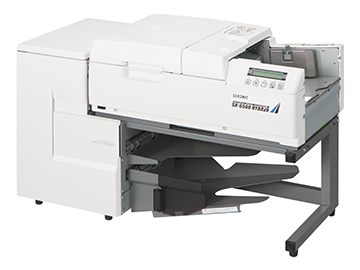
Where OMR systems fit in real operations
OMR technology is widely used wherever large numbers of structured paper forms need to be read quickly. Typical use cases include examination answer sheets, questionnaire processing, registration forms, attendance tracking, and other applications where users fill predefined boxes, circles, or ovals by hand.
Compared with manual entry, an OMR workflow helps reduce repetitive data handling and improves consistency across large batches. In environments where paper remains the preferred or required input medium, these systems support a practical bridge between physical forms and downstream databases, reporting tools, or custom software.
What to expect from this Optical Mark Reader category
This category focuses on form-reading equipment from SEKONIC, including standard OMR readers and hybrid devices that add image scanning functions. The portfolio covers multiple performance levels, with examples ranging from the compact SEKONIC SR-1800EX Optical Mark Reader for lower-volume tasks to higher-throughput models such as the SEKONIC SR-11000 Desktop-type optical mark reader.
Several units are designed around automated paper feeding, PC connectivity, and compatibility with common form dimensions used in batch processing. Depending on the model, users may also find options for single-side or dual-side reading, printer functions, reject tray handling, and barcode support as part of a broader document processing workflow.
Standard OMR readers and hybrid models
A useful way to evaluate this range is to separate standard OMR readers from hybrid OMR systems. Standard OMR devices focus primarily on detecting marked responses on prepared forms. They are often a good fit when the main priority is reading speed, stable form transport, and reliable interpretation of pencil or pen marks according to the selected sensor configuration.
Hybrid models extend that role by adding image capture through CIS-based scanning. Products such as the SEKONIC SR-3500HYBRID, SEKONIC SR-6500HYBRID, and SEKONIC SR-8000 HYBRID are relevant when operators need both answer recognition and a digital image record of the document. This can support verification workflows, archive requirements, or applications where visual review of the sheet is still important after mark extraction.
How to choose the right OMR machine
The right selection usually depends on four factors: daily form volume, required read mode, document format, and integration needs. If your operation handles relatively small batches or needs a compact footprint, an entry-level desktop model may be sufficient. For repeated high-volume cycles, a higher-speed system with a larger feeder and output handling becomes more suitable.
It is also important to consider whether you only need mark reading or whether image capture should be included. For example, a pure OMR workflow may align with units such as the SEKONIC SR-3500, SR-6000, or SR-6500, while a hybrid workflow may be better served by the SR-3500HYBRID, SR-6500HYBRID, or SR-8000 HYBRID. If your process includes coded forms, model variants with barcode-related options may also be relevant, and teams comparing adjacent data-capture tools may also want to review the barcode scanner category.
Key technical considerations before purchase
In practical B2B deployment, performance should be assessed beyond headline speed alone. Form size range, supported paper weight, feed stability, mark discrimination, and available reading sides all affect how well a system performs in production. Some applications require only one-sided reading, while others benefit from optional dual-side processing for more complex form layouts.
Connectivity is another important point. Across the models shown here, USB is commonly available, while some units also support RS-232C for integration with older systems or established machine interfaces. If your workflow includes print confirmation, reject handling, or form identification, it is worth checking whether the selected model supports integrated printing, stacker options, or barcode functions as part of the full processing path.
Representative models in this range
For organizations looking at compact equipment, the SEKONIC SR-1800EX provides a smaller-scale solution for mark reading tasks. Mid-range desktop readers such as the SEKONIC SR-3500 and SEKONIC SR-6000 offer a balance between throughput and footprint, while the SEKONIC SR-6500 moves toward heavier-duty paper form processing.
On the hybrid side, the SEKONIC SR-3500HYBRID and SR-6500HYBRID are positioned for workflows that need both OMR and image data. At the upper end of the examples listed here, the SEKONIC SR-11000 and SR-8000 HYBRID address environments where faster processing and more advanced document handling are priorities. If your broader workflow includes mobile data collection around warehousing or field operations, a handheld terminal may also complement paper-based capture processes.
OMR in a wider document and data capture workflow
OMR equipment is rarely used in isolation. In many organizations, it sits inside a wider process that may include form design, printing, distribution, scanning, verification, and export into business systems. Hybrid models are especially useful when departments want both response extraction and image retention without splitting the workflow across multiple devices.
There are also cases where OMR is combined with barcode-based identification, labeling, or print-related operations. For teams managing coded documents, labels, or adjacent print tasks, it can be useful to explore related solutions such as label printing and related printing systems. This helps build a more complete document handling environment rather than evaluating form readers in isolation.
FAQ
What is the difference between OMR and image scanning?
OMR is designed to detect predefined filled marks on a form, while image scanning captures the visual content of the page. A hybrid unit can do both, which is helpful when digital archiving and mark extraction are needed together.
Are these readers only for exam answer sheets?
No. They can also be used for surveys, application forms, registration documents, attendance sheets, and other structured paper forms with marked response areas.
How important is form design when choosing an OMR device?
It is very important. Read accuracy depends not only on the hardware but also on paper quality, mark area layout, alignment, and the writing method expected by the reader configuration.
Choosing an OMR system is mainly about matching form design, throughput expectations, and data handling requirements to the right device class. Whether you need a compact reader for routine batches or a hybrid desktop model for higher-volume processing with image capture, this category provides a focused starting point for evaluating the available SEKONIC options.
-
-
-
-
-
-
-
-
-
-
-
-
-
-
-
-
-
-
-
-
-
-
-
-