


UV printer
Printing on plastic cards, rigid media, and specialty surfaces usually requires more than a standard office printer can deliver. Buyers comparing solutions in this area often look for consistent image quality, durable output, and a workflow that fits either short-run customization or larger production needs. In that context, UV printer options are often considered for applications where surface adhesion, color stability, and media flexibility matter.
For business users, the key question is not only print quality but also how the printer fits into the broader identification, labeling, or card-printing process. Depending on the production method, a UV-based setup may sit alongside dedicated card printers, media handling tools, and consumables, especially when the job involves PVC cards, branded items, or small-format rigid products.
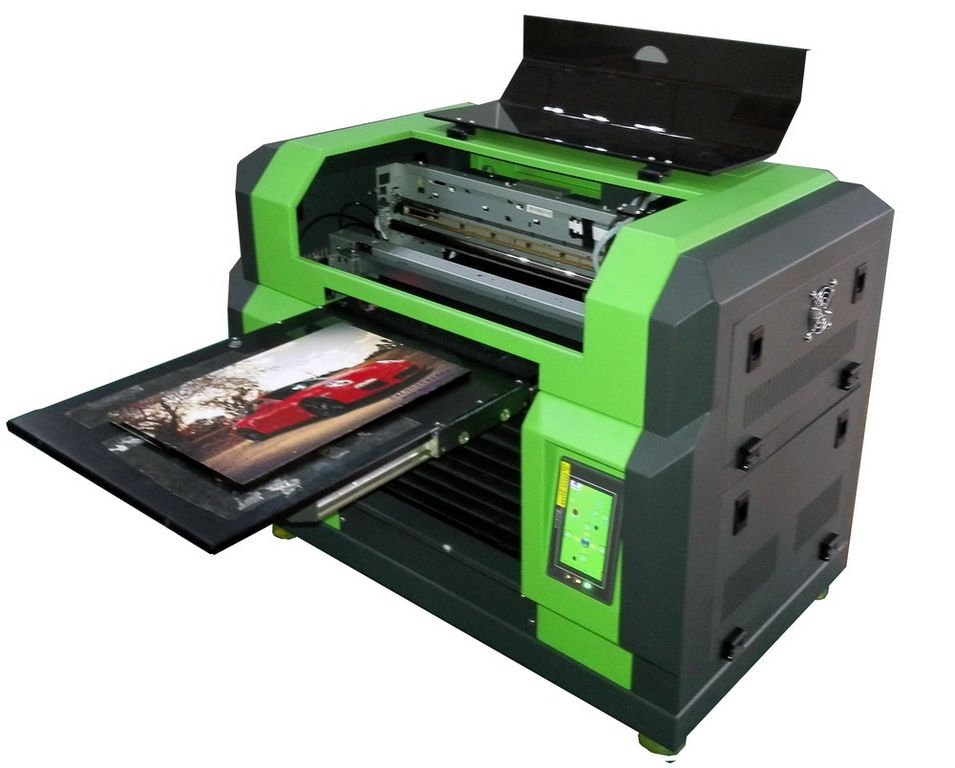
Why UV printing is used for PVC cards and rigid surfaces
When printing on PVC or similarly smooth materials, ink adhesion becomes a practical concern. Unlike standard paper, plastic card surfaces are less absorbent, so the printing process must support stable ink placement and reliable curing. This is one reason UV printing is frequently evaluated for premium-looking card output, promotional items, and other rigid substrates.
A well-configured UV printing process can help produce sharper graphics, readable text, and better resistance to smudging on demanding surfaces. This becomes especially important when a design includes small logos, serial elements, or machine-readable content such as barcodes and QR codes.
Image quality, resolution, and printhead control
Resolution remains one of the first technical checkpoints in printer selection because it directly influences edge sharpness, text clarity, and the appearance of fine graphic details. For plastic card work, those details often determine whether the final output looks acceptable for internal use or polished enough for customer-facing applications.
Beyond quoted dpi figures, printhead precision also affects color uniformity and droplet control. In practical use, stable printhead performance helps reduce banding, uneven coverage, and visible defects that are more noticeable on non-porous surfaces. For buyers comparing categories, this is also a useful distinction from systems such as thermal printer solutions, which serve different media and output requirements.
The role of RIP software in production consistency
Hardware is only one part of a reliable UV workflow. In many production environments, RIP software supports image processing, color handling, and job control so that output remains consistent from one batch to the next. This matters even more when print jobs involve colored cards, layered graphics, or materials that react differently to ink density.
RIP tools are also valuable for managing white layers and optimizing ink usage. In real production, that can improve color appearance on darker or transparent media while helping reduce waste on repeat jobs. For teams evaluating equipment investment, software capability is often as important as the printer itself because it influences daily operating efficiency.
Choosing suitable equipment for different print volumes
The right machine depends heavily on expected output volume, media type, and finishing requirements. Smaller-format setups may be suitable for short runs, sample production, or in-house customization where flexibility is more important than throughput. Larger production environments usually prioritize uptime, repeatability, and handling efficiency over compact footprint.
Some buyers also compare UV printing with dedicated card-printing platforms from brands such as Zebra and ENTRUST. Models such as the Zebra ZC100 Card Printer, Zebra ZC300 Card Printer, Zebra ZC350 Card Printer, Zebra ZXP 7 Card Printer, and ENTRUST SD360 Card Printer illustrate how specialized card printers fit applications focused on ID cards and PVC card issuance rather than broader rigid-surface printing.
Consumables and accessory considerations
Printer selection should also account for the surrounding consumable ecosystem. In card-printing workflows, ribbons, paper media, and accessories directly affect operating continuity and output quality. This is especially relevant for organizations that need predictable replenishment and consistent results across multiple jobs or departments.
For example, the Zebra 800300-250AP YMCKO Ink Ribbon For ZC300 Printer and Zebra 800300-350AP YMCKO Ink Ribbon For ZC300 Printer support specific card-printing tasks within the Zebra platform. Accessories such as the KERN YKB-A10 Paper rolls are different in role, but they highlight the same procurement principle: the full workflow should be evaluated, not only the main machine.
How UV printers fit within a broader printing workflow
In many businesses, UV printers are not purchased in isolation. They are part of a wider marking and printing environment that may include barcode labeling, receipts, product identification, or packaging support. Understanding that ecosystem helps buyers avoid selecting equipment that is technically capable but operationally mismatched.
If your application extends beyond rigid media or cards, related categories such as barcode printer systems or receipt printer solutions may also be relevant. These categories serve different output formats, but they often appear in the same operational environment across retail, warehousing, education, and service businesses.
Selection points before making an investment
Before choosing a UV printer, it is worth reviewing a few practical points: the materials you plan to print on, the durability you expect from the printed surface, the software workflow, and the level of operator training required. Maintenance planning also matters, especially for printheads, curing components, and regular calibration.
Total cost of ownership should include consumables, maintenance effort, operator familiarity, and expected production volume. A lower initial purchase price may not translate into better long-term value if print consistency, downtime, or media compatibility become recurring issues.
Finding the right solution for your application
A suitable UV printer is usually the one that matches your actual substrate, quality target, and production pace rather than the one with the longest feature list. For PVC cards and rigid media, the most important factors tend to be image clarity, adhesion performance, workflow control, and dependable operation over time.
Whether you are comparing UV printing with dedicated card printers or building a broader print ecosystem, a careful review of media, consumables, and daily operating needs will lead to a more reliable decision. That approach helps ensure the selected equipment supports both current jobs and future scaling without unnecessary complexity.
-
-
-
-
-
-
-
-
-
-
-
-
-
-
-
-
-
-
-
-
-
-
-
-